Safari extension · iPhone · iPad · Mac

Supercharge

Block popups, refresh, dark mode & more.

A Safari extension for iPhone, iPad and Mac. Seven tools in one extension. Cookie prompts and sign-up walls disappear, ads are blocked, dark sites stay dark, and selected text becomes something you can act on.

iPhone · iPad · Mac — one purchase covers all three US$4.99 · One time · Family Sharing

Coming soon Data Not Collected

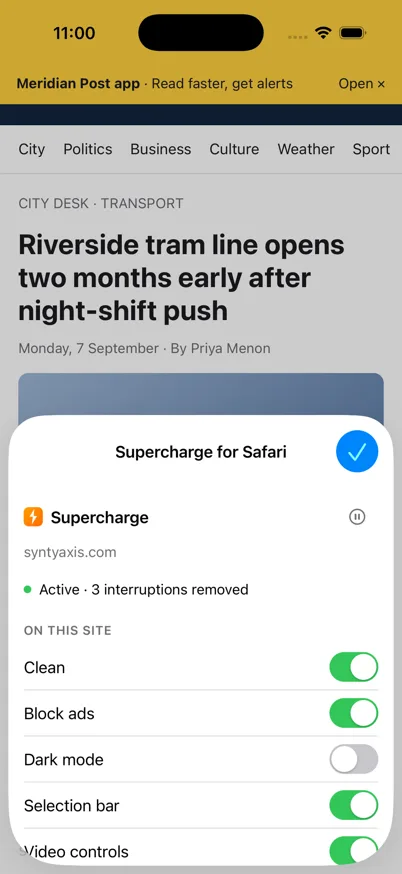
Supercharge popup on an iPhone showing the site status, the module switches and the pause control

The point of it

What it removes

Cookie prompts

Rejected, not accepted. The banner goes and the page stays where it was.

Sign-up walls

Newsletter overlays, "continue reading" gates and the dimmed background behind them.

Ads

A Safari content blocker with about 60,000 rules from EasyList, plus an optional regional list for your country.

The rest of the clutter

Sticky bars, "open in app" banners, sponsored cards, and articles cut off behind "read more".

Six modules and Watch

Seven tools

Each one can be switched off on its own, and each one can be switched off for a single site.

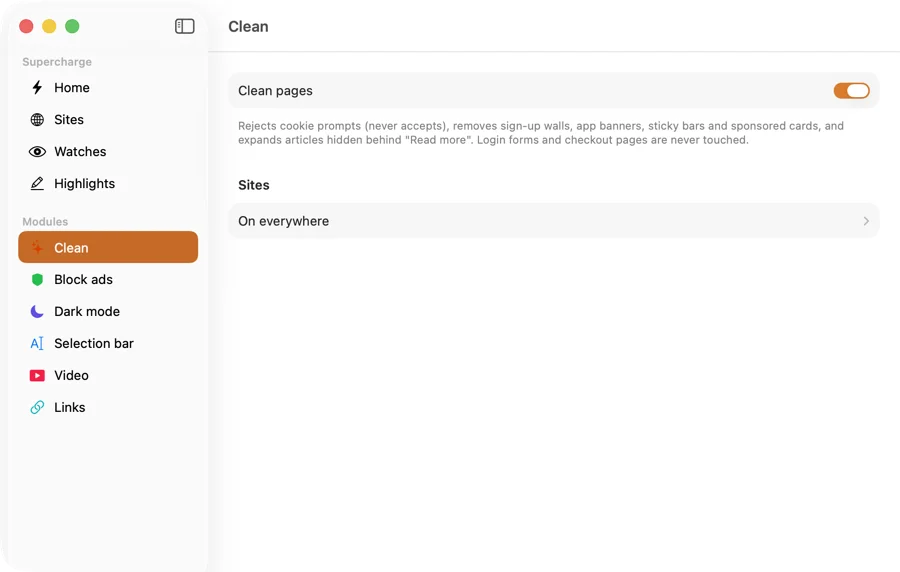
Clean

Removes the things a page puts in front of what you came for.

  • Rejects cookie prompts instead of accepting them
  • Hides sign-up walls, scroll walls and the overlays behind them
  • Hides "open in app" banners and sticky bars
  • Hides sponsored cards in article feeds
  • Expands articles that are cut off behind "read more"
Block ads

A Safari content blocker, using Safari's content-blocking API.

  • EasyList, about 60,000 rules, plus an optional regional list (the rules we ship)
  • Per-site allowlist, so you can leave a site's ads alone in one tap
  • Rules are bundled with the app; nothing is fetched to make it work

Filter lists © their authors, used under their licences. EasyList attribution appears in the app and in the footer of this site.

Dark mode

A dark theme for sites that never made one.

  • Applies only where the site has no dark mode of its own
  • Three themes: Classic, Soft and High contrast
  • On or off per site

Selection bar

Select any text and a bar appears with things you can do with it.

  • Open an address in Maps
  • Call or message a phone number
  • Convert currencies and units
  • Convert a time to your time zone
  • Search the selection
  • Copy it clean, or copy it as Markdown
  • Save it as a highlight
  • On-device AI: explain it, pull out key points, ask a question about it, draft a reply

The AI actions need iOS 26 or macOS 26 with Apple Intelligence. They run on your device. Everything else in the Selection bar works on iOS 17 and macOS 14.

Watch

Keep a page under observation without sitting on it.

  • Refresh a page on a timer
  • Alert you when the page changes
  • Alert you when a keyword appears, or disappears

On iPhone, Watch runs while the page is open.

Video

Controls Safari does not give you.

  • Picture in picture for any video
  • Playback speed
  • Picture in picture starts automatically when you leave the tab

Links

Small fixes for links and pages that fight back.

  • Google Maps links open in Apple Maps
  • Copy and right-click work again on sites that block them

Control

Pause it in one tap

Some sites need their own scripts to work. Pause Supercharge for 15 minutes, for an hour, until you turn it back on, or for that site only.

Pause from the Safari popup, from the app, from the menu bar on Mac, from Shortcuts, and from Control Center.

The counter

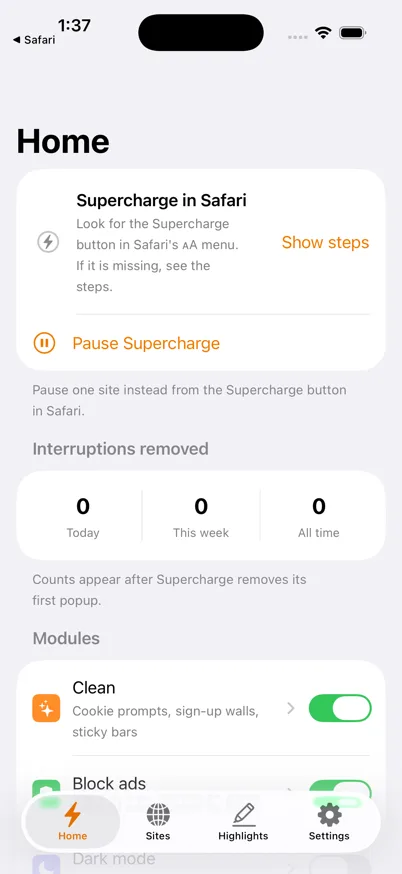
It keeps a count

Supercharge counts what it removed for you — today, this week, and all time. The count is stored on your device and is never sent anywhere.

The numbers live on your device only. There is no server to send them to.

Screenshots

Screenshots

Supercharge popup showing the module switches and the pause control
The popup, with every module and the pause control.
The Supercharge app Home tab with the pause control, the interruption counter and the module list
The app: pause, the interruption counter, and the modules.
The Supercharge app on Mac: the Clean module page with its switch and per-site control, and the sidebar listing every module
The Mac app: each module has its own page and per-site control.

Privacy

There is no server

Data Not Collected

Supercharge has no server. There is nothing to sign in to, nothing is collected, and nothing about your browsing leaves your device. Its App Store privacy label is Data Not Collected.

Read the full policy →

Requirements

Requirements

iPhone and iPad

iOS 17 or later.

Mac

macOS 14 or later.

On-device AI actions

The Selection bar's AI actions need iOS 26 or macOS 26 on a device with Apple Intelligence. Everything else works without it.

Universal purchase: buy once, use on iPhone, iPad and Mac. Family Sharing is on.

Price

US$4.99, once

Priced in your local currency on the App Store. No subscription, no in-app purchases, no upsell inside the app.